
GitLab VPS, self-hosted and preinstalled
GitLab CE comes installed and running, so you push your first repository the moment you log in. Your source code, pipelines and container images stay on a machine you own, with full root access, NVMe storage and a dedicated Vietnam IPv4. Billed monthly, and you never pay per seat.
- Unlimited users
- No CI minutes
- Container registry
- Self-hosted
GitLab VPS plans
GitLab documents a baseline of 8 vCPU and 16 GB of memory for a single-node install, so we only open the tiers that actually run it well. Both plans sit on NVMe with a dedicated Vietnam IPv4, and GitLab CE is configured before you get the login.
- GitLab CE and GitLab Runner, preinstalled
- HTTPS with Let's Encrypt from first login
- Unlimited users, no CI minute metering
- Full root, edit
gitlab.rbas you like
Not sure which plan fits, or need something bigger?
See all plans and pricingFrom commit to deploy, on runners you own
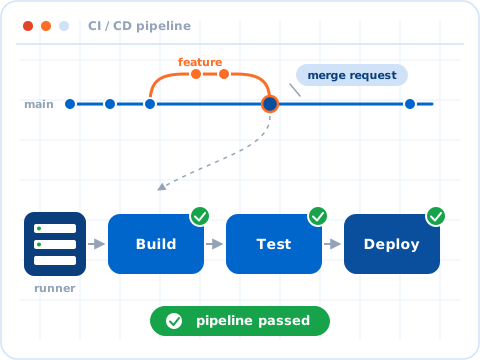
A merge request kicks off the same GitLab pipeline your team already knows. Build, test and deploy stages run on GitLab Runner registered against your own instance, so there are no metered minutes and no shared fleet.
- Commit and open a merge request
- Build and test on your own runner
- Publish images to the container registry
- Deploy from the same box, close to your users
GitLab ready on login, full root behind it
SSH in and GitLab CE is already serving over HTTPS. Create your first group, push a repository and register a runner. You still hold full root, so you tune gitlab.rb, resize Puma workers, mount a bigger volume for the registry or restore a backup on your own schedule.
- Preinstalled
- GitLab CE, Omnibus package
- Storage
- NVMe SSD, never SATA or HDD
- IPv4
- 1 dedicated Vietnam address
- Support
- 24/7 ticket, from 790.000đ/mo
- GitLab CE
- latest stable
- Install method
- Omnibus
- Runners registered
- 2
- Configuration
- 8 vCPU · 16 GB RAM
- Storage
- 100 GB NVMe SSD
- Region
- Vietnam
A Git platform you actually own
Hosted Git services bill per seat, meter your CI minutes and keep your code on someone else's disk. This is a dedicated machine with committed resources where the repositories, the pipelines and the registry all belong to you.
No seats, no CI minutes
GitLab CE is free and open source. Add as many users as your team needs and run pipelines until the CPU runs out. You pay for the server, not for headcount.
Source code stays in Vietnam
Repositories, artefacts and backups live on NVMe in our Vietnam datacenter, on a dedicated IPv4 you control. Nothing is replicated to a region you did not choose.
CI/CD close to your users
Register runners on the same box or on a second VPS. Clones, pulls and pipeline artefacts move over local network paths instead of crossing an ocean on every job.
Full control, no black box
Edit gitlab.rb, swap the bundled PostgreSQL for an external one, point object storage elsewhere, or upgrade on your own timetable. Nothing about the install is locked down.
What comes preinstalled
Every GitLab VPS ships with the Omnibus package and the services it depends on, already wired together. Prefer a clean slate or a different setup? Reinstall the OS anytime, free of charge.
 GitLab CElatest stable, OmnibusGitLab RunnerCI/CD, Docker executor
 PostgreSQLbundled, tuned for GitLab
 Rediscache, queues, sessions
 Nginx + Let's EncryptHTTPS from first login
Built for real engineering teams
With root on the box and NVMe underneath it, the GitLab VPS carries the work a development team does every day:
- Private repositories
- Unlimited private projects and groups, with merge requests and code review built in
- CI/CD pipelines
- Build, test and deploy with runners you own, without metered pipeline minutes
- Container registry
- Push and pull your own images from the registry that ships with GitLab
- Code that cannot leave
- Projects under NDA or regulatory scope, kept on infrastructure you can point to
- Issue and release tracking
- Boards, milestones and releases alongside the code, in one place
- Migration off hosted Git
- Import from GitHub, Bitbucket or gitlab.com and keep history, issues and merge requests
Frequently asked questions
How much RAM does self-hosted GitLab really need?
Which GitLab edition is preinstalled?
Is GitLab Runner included, and where does it run?
Is HTTPS set up for me?
Can I migrate an existing GitHub or gitlab.com project across?
How do backups work?
gitlab-backup create, which archives repositories, the database, uploads and the registry into a single tarball. Schedule it with cron and copy the result off the server. The snapshots and backups available on your VPS cover the whole disk as a second layer. We recommend keeping off-server copies of anything important, on a regular schedule.